
- Interactive 3D technology
- Use cases
-
Case studies
-
-
- Fashion
- Zegna X
-
- Automotive
- PEI Mobility
- UP Design
-
-
- Resources
- FAQ
- The Company
- Contacts
In the world of digital graphics and three-dimensional design, rendering software is a fundamental tool for turning virtual models into high-definition images capable of faithfully simulating real materials, lights, and settings.

Rendering is not just a technical phase: it is the moment when the project comes to life, gaining realism, emotion, and communicative power. To achieve professional-quality results, it is essential to choose the most suitable software, taking into account the type of project, the level of detail required, and the output requirements.
On this page we will discover:
- what exactly rendering programs are
- what the main available types are
- how to choose the best solution based on your operational needs
What rendering programs are
Rendering programs are software tools designed to turn digital three-dimensional models into two-dimensional images or photorealistic animations.
The main purpose of these tools is to simulate the behavior of light, materials, and surfaces to create realistic visual representations for projects in architecture, design, entertainment, engineering, and visual communication.
The creation process involves several interconnected phases:
Rendering software works by processing the information contained in 3D models, such as geometries, textures, lights, and cameras, applying complex mathematical algorithms that calculate how light interacts with surfaces. Depending on the technology used, rendering can take place in real time, with immediate results, or through slower processes capable of achieving extremely high levels of detail.
It is important to distinguish between modeling software and rendering software: the former handles the creation and definition of three-dimensional geometries, while the latter focuses on the final visual appearance, adding depth, realism, and atmosphere to the scenes created.
In professional workflows, modeling and rendering are often handled by different tools, although many modern software packages tend to integrate both processes to optimize time and resources.
What rendering programs are used for
Rendering programs are used in fields where the realistic visualization of a product, a project, or a space is essential for communicating, selling, or deciding. Their applications range from marketing to technical design, all the way to the customization of objects and virtual environments.
Creating photorealistic images from 3D models
This software makes it possible to generate high-definition images from three-dimensional models, rendering every detail realistically: materials, textures, reflections, lights, and shadows are simulated to provide a faithful representation of the final result. It is an essential phase for architectural projects, product design, or commercial visualizations.


Real-time visualization for presentations and configurators
Some programs offer real-time rendering modes, allowing the user to interact directly with the model: rotate it, change its options, switch finishes or settings, and see the results instantly. This capability is crucial in 3D configurators and interactive presentations, where the user experience has a direct impact on purchasing decisions.
Support for sectors such as architecture, industrial design, e-commerce, and automotive
Rendering is a strategic resource in numerous sectors: it helps communicate architectural projects before construction, showcases digital prototypes in industrial design, enriches the e-commerce shopping experience with dynamic, customizable images, and highlights details in sectors such as automotive or fashion, where every variant carries weight in the end customer’s choice.

Rendering turns the idea into an image, and the image into value
Types of rendering software
There is no single type of rendering software: each program is designed to meet specific needs in terms of visual quality, processing times, flexibility, and intended use.
Knowing the main available types is essential for choosing the most suitable solution based on the project, the industry, and the resources available.
Photorealistic rendering software
Software for photorealistic rendering is designed to produce extremely realistic digital images, in which every detail, from the refraction of light on glossy materials to the subtlest shading, is calculated with physical precision.
These tools are used mainly in architecture, product design, interior design, and the film industry, where visual quality is a critical element in presenting or selling a project.
The main features include the use of advanced algorithms such as ray tracing or path tracing, support for PBR (Physically Based Rendering) materials, and the integration of realistic light and texture libraries.
This software often requires longer processing times than real-time rendering, but it guarantees an exceptional level of visual detail, perfect for brochures, professional presentations, or print content.
Real-time rendering software
Real-time rendering software makes it possible to view 3D models immediately, with no waiting time for the final image to be calculated.
The term real-time rendering refers to the system’s ability to update the three-dimensional scene in real time as the user interacts with the model: rotating the object, changing materials, modifying dimensional parameters or product variants.
This technology underpins 3D configurators, immersive environments, interactive simulations, and virtual or augmented reality applications.
Unlike photorealistic engines, which aim for maximum visual quality, real-time rendering prioritizes responsiveness and smooth interaction, while still delivering increasingly convincing graphics thanks to the continuous advances of graphics engines such as Unreal Engine or Unity.
Software with an integrated rendering engine
Some 3D programs include a native rendering engine, which makes it possible to handle modeling, texturing, lighting, and rendering within a single platform.
This solution is particularly popular with designers, architects, and creative professionals looking for a simpler, more immediate workflow, without having to export models to external software.
The main features of these tools are operational speed, full integration between modeling and visualization, and, in many cases, the ability to get rendering previews directly during the creative process.
Although they do not always reach the same visual quality as dedicated rendering engines, integrated software packages deliver high productivity, ideal for iterative projects, quick concepts, or internal presentations.
How to choose a rendering program
Choosing the most suitable rendering program depends on a series of strategic and operational assessments.
Finding the right software means optimizing time, quality, and results, adapting perfectly to your design needs and workflow.
Here are the most important factors to consider:
-
Project goal (photorealism vs. interactivity)
If the project requires extremely realistic images for static presentations or advertising content, a photorealistic rendering engine will be preferable.
If, instead, the goal is to create interactive experiences, such as 3D configurators or VR/AR environments, it will be essential to choose software optimized for real-time rendering. -
User skill level
Some professional software offers advanced features but requires a high level of technical skill, while other software focuses on simpler interfaces and guided workflows.
Assessing your own level of experience helps you avoid overly steep learning curves and start producing results sooner. -
Budget and license (open source vs. commercial)
There are free open source solutions, ideal for those with limited budgets or non-professional needs, and commercial solutions that offer superior performance, dedicated technical support, and continuous updates.
The choice must take into account not only the initial cost, but also future upgrade and scalability needs. -
Integration with other tools (e.g., CAD, configurators)
It is essential to verify that the software is compatible with the tools already in use, such as CAD modeling software, architectural design platforms, or product configurators.
Good integration reduces work times, improves efficiency, and enables smoother data management across different operating environments.
Choosing the ideal rendering software comes from balancing quality, usability, project goals, and strategic vision
Examples of rendering program use
Rendering programs are extremely versatile tools, used in a great many professional contexts to turn three-dimensional models into striking images or immersive experiences.
Here are some of the most common applications:
Architectural rendering
Used to visualize buildings, interiors, and exteriors even before they are built. It is an essential tool for communicating the project to clients, owners, and stakeholders, showing materials, lights, and atmospheres in a realistic and engaging way.


Product and packaging design
It makes it possible to simulate everyday objects, electronics, furniture, or packaging, testing finishes, colors, and shapes without having to resort to physical prototypes. It speeds up the creative process and improves product presentation.
Animation and game design
Used to create settings, characters, and complex scenes in the digital entertainment industry. Rendering is a fundamental part of the graphics engines of games and animated productions, both for realism and for visual style.

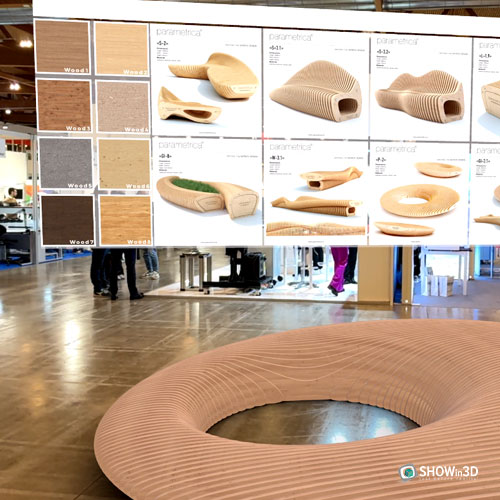
Augmented and virtual reality
Rendering software is the foundation of immersive AR and VR experiences, where visual quality must be combined with real-time performance. It makes it possible to create interactive simulations for training, marketing, configuration, and storytelling
Whatever the industry, rendering gives shape to ideas, turning the project into a visual experience
Differences from similar terms
In technical and everyday language, rendering programs are often confused or overlapped with other 3D graphics tools, such as modeling or animation software.
Clarifying the differences between these concepts helps you find your way when choosing the tool best suited to your operational or creative needs.
3D modeling programs
3D modeling programs are tools dedicated to the creation of three-dimensional objects, environments, or characters, using geometric construction techniques such as polygonal modeling, NURBS, or digital sculpting.
Unlike rendering software, which handles realistic visualization, modeling programs focus on defining shapes and structures, establishing the foundation to which the rendering process will then be applied.
Many workflows involve using the two tools in combination: first the object is modeled in dedicated software (such as Blender, Maya, or Rhino), then it is imported into a rendering engine to generate photorealistic images.
Some modern software integrates both capabilities, but the distinction between modeling and rendering remains central to understanding the phases of the creative process.
Modeling gives shape to the idea, rendering makes it visible
3D visualization
3D visualization is a broader concept that encompasses all the techniques and processes aimed at representing objects, environments, or concepts in three dimensions.
It can include static renders, animations, interactive simulations, product configurators, and augmented or virtual reality applications.
Compared with rendering programs, which focus mainly on creating high-quality images or videos, 3D visualization also covers aspects related to interaction, real-time navigation, and integration with other digital systems.
It is a cross-disciplinary field with applications in architecture, design, marketing, training, engineering, and entertainment.
While rendering perfects the image, 3D visualization builds the experience
2D rendering
2D rendering concerns the generation of two-dimensional images from vector data or simple graphic representations.
Unlike 3D rendering, it does not involve handling volumes, three-dimensional perspectives, or complex simulations of lights and materials in space.
2D rendering is often used in fields such as graphic design, digital illustration, two-dimensional CAD drafting, or the creation of textures to be applied later to 3D models.
Although it is less complex from a technical standpoint, it remains a fundamental tool for visual communication, especially when clarity, simplicity, or speed of production is required.
If 3D rendering immerses you in space, 2D rendering translates the vision onto a plane
Related terms
To better understand the scope of rendering programs, it is useful to also know some closely related concepts:
-
3D modeling
The art and technique of creating three-dimensional models that define shapes, surfaces, and volumes in digital space. Modeling is the fundamental first step before moving on to rendering. -
Real-time rendering
A rendering process performed in real time, in which changes to and interactions with the model are displayed instantly. It underpins 3D configurators, VR/AR applications, and interactive simulations. -
Interactive visualization
Technologies that allow users to explore and customize 3D models dynamically, changing parameters, materials, or perspectives in real time. -
PBR (physically based rendering)
A rendering technique that simulates the physical behavior of light on materials, achieving extremely realistic results. PBR is now a standard in industries that require high visual fidelity. -
Rendering engine
Software, or a software component, responsible for calculating images from 3D models. There are rendering engines specialized for photorealism, real-time, or other specific applications.
SHOWin3D: the 3D Software for interactive visualization
SHOWin3D, developed by Shin Software, represents the cutting edge of 3D programs, taking visualization beyond simple traditional modeling. Unlike conventional 3D software focused on creating models, SHOWin3D turns existing 3D assets into interactive, immersive experiences that revolutionize the way products and environments are presented and perceived.
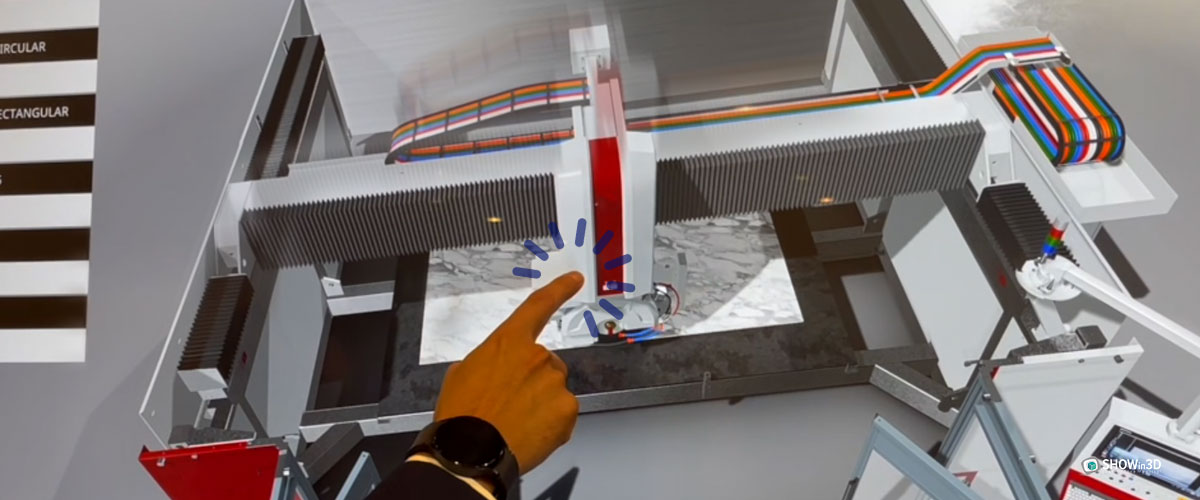
Key features that set SHOWin3D apart as 3D Software
SHOWin3D stands out from other 3D programs thanks to a unique combination of powerful features:
-
No-code development:
enables the creation of advanced interactive 3D configurations without any programming knowledge, making the technology accessible to designers and marketing professionals. -
Photorealistic UHD rendering:
real-time visualization of materials, finishes, and lighting with an exceptional level of detail and precision. -
Cloud-native architecture:
global access and seamless scalability for projects of any size. -
Multi-device optimization:
smooth performance on desktops, tablets, and mobile devices without compromising visual quality. -
Advanced AR/VR integration:
support for immersive experiences that let customers interact with virtual products in real environments.
A professional designer stated:
In SHOWin3D we found an extraordinary tool, capable of visualizing architectural solutions in photorealistic quality even before they are physically built
Applications for interior design
SHOWin3D transforms interior visualization with specific features:
-
Kitchen design:
interactive configuration of modules, appliances, and finishes, with virtual opening of drawers and doors. -
Bathroom visualization:
realistic rendering of reflective surfaces and the play of light on ceramics and glass. -
Bedrooms:
simulation of natural light at different times of day, with detailed representation of fabrics and materials. -
Furniture display:
a complete library of customizable furnishing elements with 360° exploration.
Projects carried out with SHOWin3D have demonstrated concrete benefits, including a 30% reduction in review times and a marked improvement in customer satisfaction thanks to clearer, more interactive visualization.
Seamless integration with the digital ecosystem
Unlike standalone 3D programs, SHOWin3D integrates seamlessly with existing digital infrastructures:
-
Connectivity with CAD software:
direct conversion of technical models into interactive visualizations. -
Integration with business systems:
seamless connection with CRM and ERP systems. -
Compatibility with e-commerce platforms:
native integration with the leading online sales systems.
Thanks to these integrations, SHOWin3D turns every customer interaction into an opportunity for efficiency, customization, and growth, connecting visualization to business dynamics in a way unmatched by traditional 3D software.