
- Interactive 3D technology
- Use cases
-
Case studies
-
-
- Fashion
- Zegna X
-
- Automotive
- PEI Mobility
- UP Design
-
-
- Resources
- FAQ
- The Company
- Contacts
3D modeling is the creative and technical process that brings to life mathematical representations of objects or surfaces in a digital environment, turning abstract ideas into concrete shapes that can be viewed, manipulated and modified from any angle.
Unlike two-dimensional drawing, which is limited to height and width, 3D modeling adds depth, making it possible to create objects with real volume in virtual space. It is like moving from painting to sculpture, but with the flexibility of digital: every element can be refined, modified and adapted without wasting material or facing physical constraints.
Bring 3D technology to your company
Unlike two-dimensional drawing, which is limited to height and width, 3D modeling adds depth, making it possible to create objects with real volume in virtual space. It is like moving from painting to sculpture, but with the flexibility of digital: every element can be refined, modified and adapted without wasting material or facing physical constraints.
How 3D modeling works
Unlike two-dimensional drawing, which is limited to height and width, 3D modeling adds depth, making it possible to create objects with real volume in virtual space. It is like moving from painting to sculpture, but with the flexibility of digital: every element can be refined, modified and adapted without wasting material or facing physical constraints.
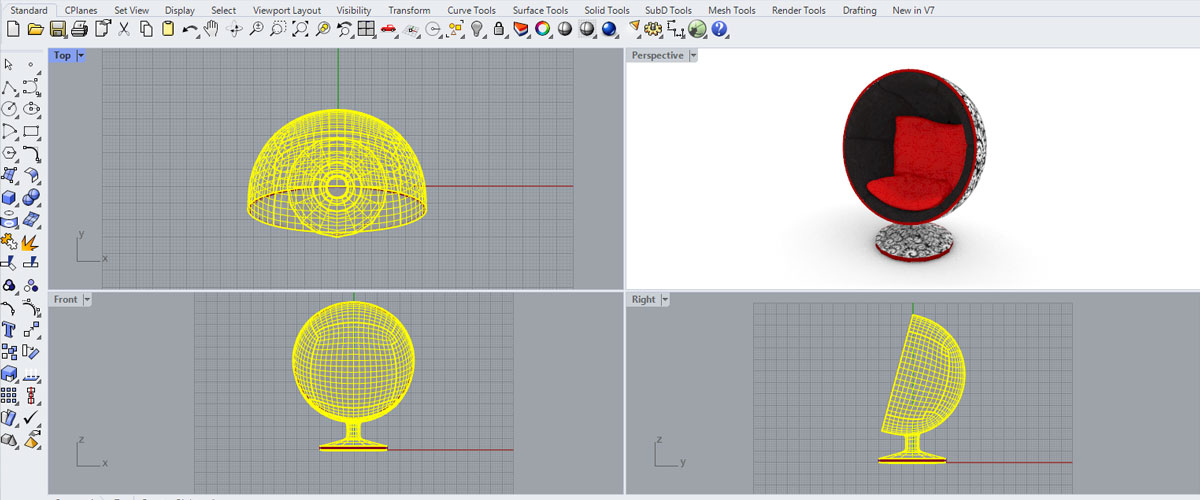
This mesh is the outer “skin” of the virtual object. The denser and more detailed it is, the higher the level of detail we can achieve in the final model, but also the greater the computing power required to manipulate and display it.
The 3D modeling process is based on a three-dimensional coordinate system (X, Y, Z) that precisely defines the position of every point in space. This system makes it possible to position, scale and rotate objects with mathematical precision, creating complex scenes made up of numerous elements.
Creating a 3D model is not just a technical matter, but a creative process that requires both artistic skills and mathematical knowledge. The modeler must understand shapes, proportions, anatomy (in the case of characters) and design principles, translating them into coherent and realistic digital structures.
3D modeling techniques
The world of 3D modeling offers several techniques, each with its own strengths and ideal applications:
Polygonal modeling
The most widespread and versatile, based on creating meshes made up of polygons. Like building with digital LEGO, this technique makes it possible to create virtually any shape. It is the method of choice for video games, animated films and interactive visualizations. Polygonal modeling uses polygons (usually triangles or quadrilaterals) to create meshes that represent the surface of objects.


NURBS modeling
The most widespread and versatile, based on creating meshes made up of polygons. Like building with digital LEGO, this technique makes it possible to create virtually any shape. It is the method of choice for video games, animated films and interactive visualizations. Polygonal modeling uses polygons (usually triangles or quadrilaterals) to create meshes that represent the surface of objects.
Digital sculpting
Perhaps the most intuitive technique, similar to traditional sculpture. The artist virtually “sculpts” a digital mass, adding or removing material. Ideal for creating characters, creatures or any complex organic shape with a very high level of detail. Software such as ZBrush and Mudbox makes it possible to work with millions of polygons, creating microscopic details such as wrinkles, pores and surface textures.


Procedural modeling
An approach in which the model is generated by following rules and algorithms rather than being sculpted by hand. It is like planting a digital seed and watching it grow according to predefined rules, perfect for natural elements such as landscapes or repetitive structures. This technique is particularly useful for creating vast environments such as cities or forests, where modeling every element by hand would be prohibitively time-consuming.
The choice of technique depends not only on the desired result, but also on the planned workflow and the specific needs of the project. Professionals often combine different techniques within the same project, leveraging the strengths of each to achieve optimal results.
Applications of 3D modeling
3D modeling has found application in numerous sectors, revolutionizing creative and production processes:
- Industrial design and prototyping: From concept to virtual prototype, every new product today starts life as a 3D model. This approach makes it possible to test shapes, ergonomics and functionality before investing in physical production, drastically reducing development costs and times.
- Architecture and visualization: Buildings and spaces can be explored even before the first stone is laid. Architects use 3D modeling to create not only the exterior of buildings, but also the interiors, the lighting and even the integration with the surrounding environment, offering clients an immersive experience of the final project.
- Entertainment: Films, TV series, video games and advertising make extensive use of 3D modeling. From characters to settings, from special effects to animations, 3D has transformed the entertainment industry, making it possible to create fantasy worlds indistinguishable from reality.
- Medicine: From visualizing organs to planning complex surgical procedures. 3D models derived from medical scans allow surgeons to study the patient’s specific anatomy and simulate procedures, reducing risks and improving outcomes. In addition, custom prostheses and implants are designed with millimeter precision thanks to 3D modeling.
- Manufacturing: 3D printing has created a direct bridge between digital modeling and physical production. This additive technology makes it possible to create complex objects that cannot be made with traditional methods, opening new frontiers in design and mass customization.
In each of these sectors, 3D modeling is not just a technical tool, but a powerful means of communication that makes it possible to visualize, test and refine ideas before they are physically realized
Visualization with SHOWin3D
Once a 3D model has been created, its visualization and use come into play. This is where platforms such as Shin Software’s SHOWin3D transform the process, turning technical models into engaging interactive experiences.

SHOWin3D is not a modeling tool, but an advanced solution that makes it possible to:
- Display models with photorealistic real-time rendering
- Explore products from every angle with immediate interaction
- Configure variants and customizations with instant updates
- Share interactive 3D experiences through simple web links
The platform stands out for its cloud-native architecture that automates the conversion of files from various CAD formats, its support for 4K resolution with microscopic detail, and a visual editor that requires no programming skills.
With SHOWin3D, 3D rendering happens in real time, allowing immediate interaction with the displayed model. This goes beyond the traditional approach of pre-calculated rendering, where every change requires waiting for new images to be generated. SHOWin3D’s real-time technology turns visualization from a passive process into an interactive experience, ideal for sales presentations, product configurators and virtual showrooms.
From model to reality: 3D printing and configuration
3D modeling is the starting point for two fundamental developments: 3D printing and product configuration.
In 3D printing, the model is “sliced” into thin layers that guide the printer in physically building the object. This process requires specifically optimized models, with features such as closed (“watertight”) meshes and minimum thicknesses suited to the printing technology. 3D modeling for 3D printing must take into account not only appearance, but also technical constraints such as overhang angles, required supports and print orientation.
In 3D configurators, models become the basis for interactive experiences that let users customize products in real time. SHOWin3D excels in this area, turning static catalogs into virtual showrooms where customers can explore every variant and customization, instantly seeing the result of their choices.
Choosing the most suitable 3D modeling software depends on the specific needs of the project and the user’s level of experience. There are numerous software packages on the market, from professional solutions to free options for beginners. Free 3D modeling programs such as Blender offer surprisingly complete features for those who want to get started without any investment.
For those who want to deepen their skills, taking a structured 3D modeling course can significantly speed up the learning curve. A good course covers not only the technical aspects but also the artistic and design principles that are fundamental to creating effective and appealing models.
Related terms
- Mesh – The basic structure of every 3D model, made up of vertices, edges and faces.
- Polygonal modeling – The most widespread technique for creating three-dimensional objects using polygons.
- Digital sculpting – An artistic approach to modeling, similar to traditional sculpture but in a virtual environment.
- Rendering – The process of generating photorealistic 2D images from 3D models.
- UV Mapping – A technique for accurately applying 2D textures to 3D surfaces.